
The site we made together does exactly what we set out to do; it shows your forty products beautifully and brings in enquiries. Selling online is a different job, though, and the way people search has changed a lot since we built it. Here's what that means, and what we will build next.
Each one was set up separately, and each does its job. What's happened naturally is that they've grown into three islands; and the moment you start selling, connecting them becomes the real issue worth solving.
"Three sites, three audiences, three separate starts. Connected properly, each one should be helping the other two show up on Google."
The current site was built to show products and collect enquiries, and it's solid at that; clean page structure and the SEO basics are all in place. Selling online needs a different foundation, though, and search itself has changed since we built it. Here's the gap, and how quickly each part closes.
| The gap | What closing it gives you | Effort | |
|---|---|---|---|
| 01 |
Google doesn't know your products are products The 40 pages look great, but behind the scenes they're built like regular content pages, not shop listings. |
Labelled properly, those same 40 pages can show up in Google as products, with photo and price, and can be quoted by AI answers when someone asks for a pastry supplier. The pages already exist; this is a behind-the-scenes fix, not new work. | Quick win |
| 02 |
There's no blog yet A blog was never part of the original plan. |
This is the biggest missed opportunity you have. Every search that isn't your name (think "wholesale conchas" or "guava danish supplier") needs a page behind it to show up. Starting a blog is what builds that up over time. | Ongoing |
| 03 |
Page titles read like a brochure e.g. "Guava Cheese Danish - Got Pastry" |
Fine for a catalogue. For a shop, you want the words people actually type in there, like "wholesale" and "bulk". Rewriting the set takes about a day. | Quick win |
| 04 |
Product photos are heavy files Large images (145 to 426 KB each), sized for one product on a page. |
Fine for a product page, but this will slow to a crawl when viewing the entire shop on mobile. We can optimize your images for web by reducing file sizes and using new image formats. | In the build |
| 05 |
The page builder is heavy The homepage loads 35 style files and 21 scripts. |
That's the price of a drag-and-drop builder your team can edit by hand; a fair trade for a brochure. A shop can't afford it, because every extra second of load time costs you sales. This is the main reason to build the shop on a faster foundation. | In the build |
| 06 | Google isn't told you're a local bakery | A small behind-the-scenes label tells Google what kind of business you are, where you ship, and that you supply retailers. Tiny to add, big payoff for a food business. | Quick win |
| 07 |
Search itself has moved on Being read and quoted by Google's AI answers wasn't even a thing when this was built. |
More and more people ask an AI (Google's AI answers, ChatGPT) for suppliers and recommendations. Those answers are built from clear, well-written pages. It's new ground for everyone, and it's winnable while your competitors ignore it. | Ongoing |
"Nothing here needs undoing. The catalogue, the photography and the brand are the expensive part, and you already own all three."
We'd rebuild the shop on Astro, a modern way of building fast websites. Instead of assembling each page the moment someone visits, the pages are built ahead of time and delivered ready-made from servers around the world. No heavy page builder, no stack of plugins, and nothing slowing things down between you and the customer.
Nothing is assembled while your customer waits, and there's no page-builder weight to download. Pages arrive ready-made from a server near them. Faster sites sell more and rank higher on Google; that's the whole trade.
All 40 products are labelled properly from day one, so Google and AI answers can actually read, quote and display your catalogue.
You get a simple dashboard to add products, edit text and publish posts. No page builder to wrestle, nothing to break. Publish, and it's live.
Measured live on your homepage, August 2026: about 2.5× faster and roughly 70× lighter on Astro. A page builder buys easy hand-editing; a fast build buys speed, and a shop wants speed.
You asked the fair question: why a custom build when Shopify already exists, or when we could just link the two together? So here is every route on the table; what each one costs upfront and every month, how fast it is, and where it genuinely wins. We will build you a good store on any of them. We recommend the third, and below we show our work.
Subscription boxes (a weekly concha box, a monthly wholesale standing order) are the stickiest, highest-margin thing a bakery can sell online, and worth building in now rather than bolting on later. It changes the maths below. On the Shopify-based routes (1, 2 and 4) subscriptions mean adding a dedicated app, roughly $10 to $99 a month, sometimes plus a cut of every recurring order. On the custom build (3) they are part of the engine: no extra app, no extra percentage, and no separate vendor. The subscription cost is noted on each option.
The fastest, cheapest way to be selling this week. We put a "Shop" button on bonappetitbakery.com that sends people to a Shopify store at shop.bonappetitbakery.com. You set up and run that store yourself.
A plugin (ShopWP) pulls your Shopify products into WordPress, so the shop lives at bonappetitbakery.com/shop instead of on a separate domain. Cheaper than a full build, and it keeps everything under one address.
Your own storefront, built on the same fast foundation as the concepts you are about to see: all 40 products, variants, subscriptions and a full slate of features, run from one simple dashboard built around your catalogue, not a maze of plugins and settings.
If you specifically want to live inside Shopify's ecosystem, we will build and theme it properly for you. It costs more than our own build, not less, because we are working inside someone else's system, learning its themes and apps, and pricing for the friction that comes with it.
| 1 · Link out | 2 · ShopWP | 3 · Custom build | 4 · Proxy-built Shopify | |
|---|---|---|---|---|
| Upfront (Proxy) | $120 | $3,600 | $12,000 | ~$21,000 |
| Ongoing | Shopify $29–39/mo | Shopify $29–39/mo + ShopWP $199/yr | Optional $200/mo (5 design hrs) | Shopify + apps ≈ $300/mo |
| Speed | Slow | Slow | Fastest | Slow |
| Lives on your domain | Subdomain | bonappetitbakery.com/shop | bonappetitbakery.com/shop | Subdomain |
| Domain authority | Split | Kept | Kept | Split |
| Subscriptions | Add-on app | Add-on app (complicated) | Built in | Add-on app |
| Who runs the store | You | You + us | You, in one place | You + us |
| You own it outright | No | Partly | Yes | No |
Option 2 is 30 hours of setup at our standard rate; you still run the Shopify plan and ShopWP licence underneath, and the subscription plan is scoped on top.
Astro loads in about 0.6s; the Shopify store in about 1.7s. On mobile data, that gap is where carts get abandoned. 130× lighter, 12× fewer requests.
Not a claim, a live test of your two URLs run in August 2026: our concept storefront versus your new Shopify store, same page type.
"The cheap options get you selling. The custom build gets you a store you own outright; fast, safe, subscription-ready, for a fraction of what this used to cost."
Both are built with your real products and your real photography; nothing here is a placeholder. Click through, then tell us which one feels like Bon Appetit.
Chocolate, cream and butter yellow, with huge headlines and the product photos blown up and running off the edge of the page. Warm, confident, a little vintage; the heritage bakery you'd trust on a grocery shelf. Strongest for the wholesale side.
Open concept A →Your existing brand, turned into a shop. The same Windsor headlines in the same red, your real logo, your category colours, the brown band and the cream review cards; all carried straight over from the site you already have, and extended to do what a shop needs to do.
Open concept B →"Both share the same shop page, so you can see exactly how the catalogue behaves either way."
The reason sites drift out of date is that updating them is a chore. So the editor works the way you'd expect: open your site, click the thing you want to change, change it, publish. No page builder to learn, and no layout to accidentally break.
Your site opens full-screen with your real content on it. Click a headline, a paragraph or a photo, and change it right there. Flip between desktop, tablet and phone to check it before it goes out.
Add a product or a post once and it shows up everywhere it belongs: the category page, the homepage row, the related items, the sitemap. No hunting for the six places a change needs making.
Hit publish and it's out. Every version is saved, so anything can be rolled back. Nothing to update, no plugins, no maintenance window.
"The people who know the products should be able to update the site without asking anyone."
Click through the real editing panel and see how the shop is run, hands-on.
Products, orders, stock and customers all live in the same panel as the rest of the site, not a separate system you have to remember the login for.
| What you get | ||
|---|---|---|
| · | Products and variants: sizes, pack counts and flavours, with photography resized and optimised automatically on upload. | Included |
| · | Orders: paid, packed, shipped, delivered. A confirmation to the customer and a notification to your team, sent from your own domain. | Included |
| · | Stock: live counts, sold-out states, and customers can ask to be emailed the moment something's back. | Included |
| · | Categories: add or rename one and its page builds itself, nav included. | Included |
| · | Discount codes, free-shipping thresholds, and a running price history on every product. | Included |
| · | Export anything: products, orders and customers as a spreadsheet, whenever you want it. Your data stays yours. | Included |
| · | Shipping rates and labels: zone, weight and flat rates, live USPS/UPS/FedEx pricing, and ship-day rules so nothing perishable sits in a depot over a weekend. | Phase two |
| · | Abandoned cart recovery and a Google Shopping feed for your products. | Phase two |
| · | Bundles, gift cards and multi-buy offers: build-your-own-box pricing and seasonal gifting. | Phase two |
A shop is one part of it. The things that actually take up your week, like reviews, enquiries and knowing what's working, sit in the same place rather than in four browser tabs and an inbox.
Your Google reviews pulled in automatically, so you're not refreshing a dashboard to find them. Each one comes with a suggested reply you can read, adjust and post. Answered reviews are one of the strongest local ranking signals there is, and most businesses simply never get round to it.
Every wholesale and contact form lands in the panel instead of scattering across inboxes, with a reply ready to send. You can see who asked, what they asked, and whether anyone got back to them.
What people searched to find you, which products they looked at, and what sold. Written so it's useful on a Monday morning, not a wall of charts you have to interpret.
"One login. The website, the shop, the reviews, the enquiries and the numbers; not five separate tools that don't talk to each other."
A hosted store looks cheap on the pricing page. The cost arrives later, because most of what you'll actually want isn't in the box; it's a separate app, from a separate company, on its own monthly bill.
Plus an extra 0.5–2% of every order if you don't use their payment processor. Prices are typical market rates, not quotes.
Hosting plus your plan with us, and that plan is buying content and search work, not software rental.
"The app store is sold as the advantage. It's the same plugin problem you already know, from a dozen different companies, any one of which can break your site on a Tuesday."
A rebuild is a one-off. The reason your competitors show up and you don't is that they've been publishing for years. This is the ongoing piece; and it's where the real return lives.
Label all 40 products so Google reads them properly, rewrite titles and descriptions around how buyers actually search, tell Google you're a bakery, and link categories and products together cleanly. The content already exists; this is the behind-the-scenes work.
Recipes, pairings, retailer guides, "what is a concha", seasonal features. Every post links back to the products it mentions. This is the reach you currently don't have.
Dedicated pages for wholesale, foodservice and distribution; the searches that bring a purchase order rather than a single box.
More people are asking an AI for suppliers and recommendations. Those answers are built from clear, well-written pages. Right now there's nothing on the site for them to pull from.
"We're not fixing one storefront; we're connecting three sites into one thing that ranks, and then feeding it every month."
Google, and the AI answers people now read instead of scrolling (AI Overviews, ChatGPT, Perplexity), can only recommend a business that has published pages worth citing. No content, nothing to rank or quote. The work is publishing, steadily, on your own site. Here is exactly what that did for another Cleveland food brand we run content for, Rascal House, captured live from Google.
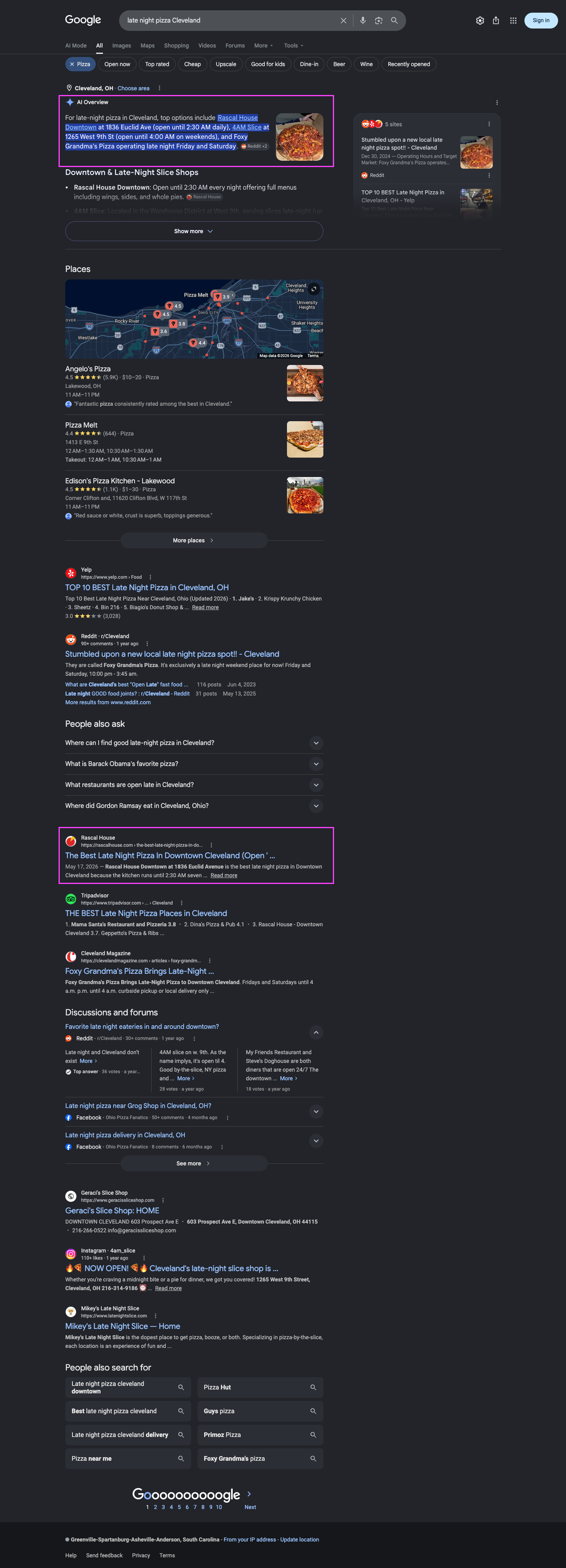
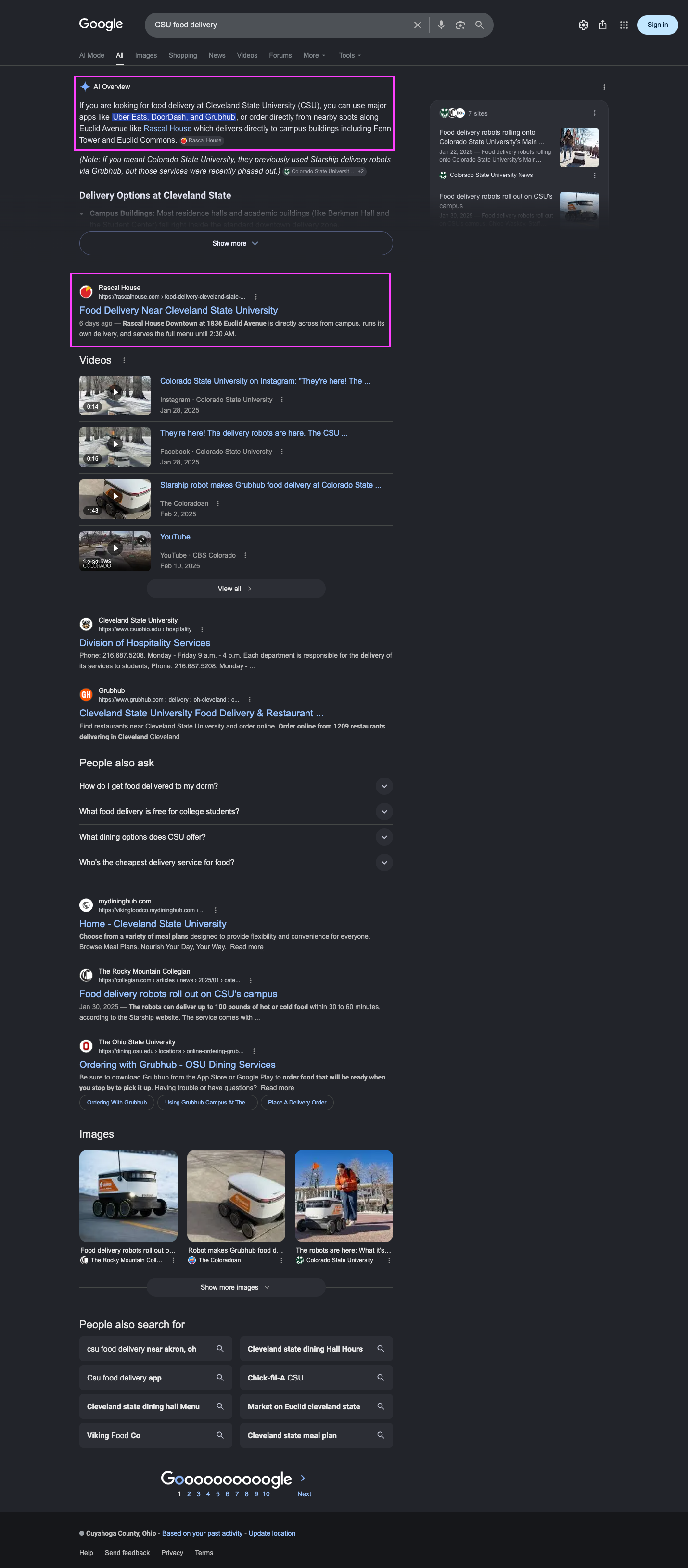
Also page one from the same program: "pizza delivery Maple Heights" and "pizza near Playhouse Square." Screenshots captured live from Google, 2026.
"The posts we published are the exact pages now ranking on page one and getting quoted by Google's AI. Some hit page one within about 20 hours of going live. That is the whole game: publish, get found, compound."
Every build we ship includes managed hosting. Pick how much hands-on help you want.
A fast storefront gets you ready; content is what actually gets you found, month after month. Pick the pace that fits.
See the full plans and what's included → madebyproxy.com/seo
You tell us A or B, or the parts you like from each. We take the winner to a full design of the homepage, shop, product page and wholesale page.
We build it on Astro, move all 40 products over and label them properly, shrink and reformat the images, set up checkout, and give your team a simple dashboard to publish without us.
Decide what happens to ba58program.com and the main site, combine their ranking strength, and forward the old links so nothing you already rank for gets lost.
Go live, then the ongoing search work starts: new content every month, technical upkeep, and a plain-English report showing what moved.
Have a look at both concepts before the call. Whichever way you lean, we'll scope it properly and send a written proposal after we talk.